Monday, March 1, 2010

Printable Family Collage Cards for Kids

Printable Christmas Family Collage Cards for Kids

When Santa's sleigh bells ring, the kids are expecting the presents wrapped in red and green. Fortunately,you manage to get to the toy store and buy a gift for your honey kids before the herald angels singing. But it couldn't be better that you customize a card with your own message and pack up with gifts for your kids on Christmas Eve.

Christmas cards is only as far away as your computer and your printer. Printable kids cards can be made only a few minutes with family picture collage maker. Kid picture cards for print in a number of formats and with a wide variety of images and greeting, and if you have a color printer, you can print cards free in full color at home. If not, print collage cards in black and white and let your kids color it in :)-

Step 1: Install the Family Picture Collage Maker

Here we use the family picture collage maker called photo collage creator as an example, since it offers a bundle of cool theme templates for family, wedding, love, baby, kids, friendship and Christmas,Happy New Year or other holidays to satisfy your any demands. Want to have a glance of these free templates, please check here for free kids digital scrapbooking templates. Applying templates, you can make a fabulous wedding, baby and family picture collage only in three steps, that convenient for the green hands and busy persons. Now let's install the program and start the fun.



Step 2: Select and Download the template

When you start the software, select "Create from Template". If you want to create Christmas cards, pick the first "Christmas(30)". The popup window is just as follow.


Step 3: Import kid-photos into the template

Carefully select the photo which can express and then double-click the center area to add from your computer disk. Or select a path from left of digital scrapbook software, and drag the photo from the left to the center area of printable kids picture cards.

Step 4: Add your own Message for Christmas Cards

Click the Taskbar of "Decorate Collage" button,and choose the "Text" tab. Type out the title in the text box, and select the font,color and text size in the center of printable kids cards. Or you can move it as a whole. What's more, you can set the shadow,halation or texture for your printable cards for kids as Christmas Gift.

Step 5: Save as image or wallpaper

An Christmas card has been simply design out, and save it as image. If you are not satisfied with it, you can decorate the printable kids cards with digital scrapbooking embellishments,such as clipart,stamp or doodle some knickknacks for further embellishment. What'more, you can use free digital scrapbooking kits to adorn your family picture collage.


Step 6: Print Out the family picture cards

If you have a color printer, you can print cards free in full color at home. If not, print the cards in black and white and let your kids color it in. From family picture collage card, you will have a more festival Christmas.

Try it free today!

Friday, February 26, 2010

Create digital scrapbook for desktop using Picasa

Desktop wallpapers are great tools to make your digital workspace a little “homey”. I often use nature desktop wallpapers if I'd like to kickback and relax, and use sports photos if I'm at work and apply Bible verses to soothe and remind me of heavenly things. Every time I need a change of desktop "scenery" I'd go to the internet to search for great desktop wallpapers.

Picasa offers a great way to make personalized desktop wallpapers. It's the COLLAGE tool of Picasa (if you don’t have Picasa2 yet, you can download it here).
Follow these simple steps to make your own desktop wallpaper:

STEP 1: Open your Picasa2 application and browse the folder where your photos are.

STEP 2: Select at least 8 photos that you want to make part of your desktop collage. (Hold down the control or shift key for multiple selections), and press the COLLAGE button below.
peter-img46.gif

STEP 3: From the pop-up window, choose TYPE=COLLAGE, OPTIONS=Your background color, LOCATION=Choose a folder… then press the "create button".

peter-img47.gif

Now you have a desktop wallpaper full of your own photos! Neat eh?


Of cource, you can have other choice. You can use another gorgeous photo collage maker to create your own personalized desktop. And if you are a Mac user, you can select the best Mac collage maker.

Other useful articles:
1. Make scrapbook with Collage Maker
2. Design Collage from Scratch
3. Happy scrapping with Photoshop Elements
4. Create Photo Collage Prints

Wednesday, February 24, 2010

Merge 2 Pictures with GIMP

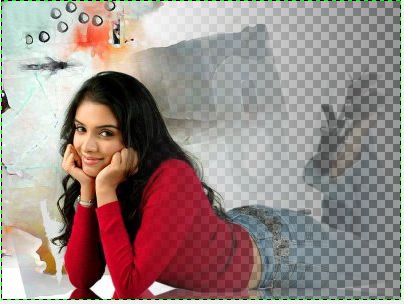
The combination of images with a fade effect is obtained very easily by using a layer mask in the photo collage creator.
We want to merge the photo of Asin Thottumkal with that of Panch Mahal,a school in India.

1) The two images to merge

2) Add a layer mask

Click on the layer of the image on the right.

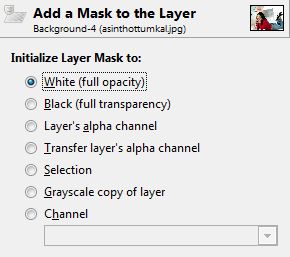
With the right mouse button, click the "Add layer mask" and the dialog box below appears.
Choose white to initialize the mask. White corresponds to opaque.

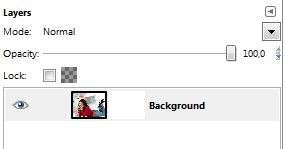
Now you get this in the layers box:


3) Create a partial transparency

Choose from the tool box:
- A black foreground color .
- A white background color.

Take the Gradient tool.

Make a gradient from right to left, starting from the edge of the
image and stopping in the middle of it, to maintain a visible part.


4) Merge the layers

In the layers window click on "Merge Layers".

Now only one layer is visible in the window.

5) Superpimpose the two images

Click on the image of the model, and "Select All" then "Copy."

Go to the landscape image, in selection mode, and click "Paste."

Move the image to fit as you want.

Save.


Monday, February 22, 2010

What's Collage?

“Collage” is a French word that means the act of gluing or sticking, so anything that you can glue together to form a piece of art can be called a collage.

The beauty of creating a collage is that anything goes. Since you decide how you want your collage to look, no two collages need ever be the same. If you’re looking for symmetry, you might want to make two collages that are exactly the same and use them to frame both sides of a window or a bulletin board, or you can use them as the front and back cover of a photo album.

Photo Collages

The most popular form of collage, of course, is a collage that’s composed of photos. The photos don’t have to be in any particular order, don’t have to tell a particular story and don’t have to be all in color or all black and white. However, if the collage will be composed of photos, search for close-up photos that are crisp and clear.

For instance, if a teenager is creating a collage for her bedroom wall, the first order of business would probably be to round up all the great, fun photos the teen has. Find photos of the teen alone as well as with friends, pets and family members. The photos can then be overlapped, turned sideways or placed upside down, depending how your teen would like them, or placed in a manner that allows the artists to create a picture, such as a flower pattern or a sunburst.

Other Fun Collage Items

Displaying photos alone is the most typical form of collage, but you can also add other materials. A collage can be made even more fun by adding bits of ribbon, stickers, word bubbles, candy and gum wrappers and borders with stencil or rubber stamping decorations. If using candy and gum wrappers, use wrappers that are from your favorite candy and gum. For example, if your name is Clark or Joy, use Clark or Almond Joy wrappers, respectively. Maybe you want to add the labels from your favorite snack foods, such as chips, popcorn, pretzels, cereal names and soda pop.

If the collage is intended to be a portrait or outline of who you are, you might want to add words from newspapers, magazines and food labels. The word Cool, taken from a Cool Whip container, can be added to the collage to signify that you are cool or that you use that word a lot. Or, you can create words with stencils and rubber stamping techniques. Large bold letters or numbers signifying the names of friends, the date and other important events in your life would add to the collage by making it both interesting and timely.

Collage Border

Not only does a border give a collage a definite edge, but it also can be used to define the person the collage is being made for. Create this look by choosing items that say something about the person. A border for a collage that is being made for a teenager or by a teenager can be created out of strips of her last exam paper, strips of ribbon, movie ticket stubs, sashes from pageants she’s won or blue ribbons she’s won over the years in sporting events. Words or messages can also be used as the border.

Collages are generally mismatched bits from a person’s life. Because pictures often tell a story, even when you didn’t engineer the collage in that manner, you’ll be surprised by what other people see or get from your collage upon seeing it for the first time.

How to Make a Collage

It’s very easy to make a collage; you are only limited by your imagination and the things you have around the house. The first thing you will want to do is pick out a background for your collage. You can make a collage on a piece of posterboard, cardboard, even a large piece of paper or sheet of yesterday’s newspaper.

There are no rules that dictate how to make a collage. If you’re doing this project with kids, watch what they do and try to bring the same sense of play to your collage work. If you haven’t done something this unstructured in awhile, you might find it difficult. There’s no right or wrong way to do it; every result is perfect. That can either be freeing or scary, depending on your personality.


A great way to remember your travel adventures is to make a collage of pictures and other mementos. Start with color copies of your favorite travel snapshots, then add things like your airplane boarding passes, tickets from shows, a matchbook from that great Italian restaurant, the lucky penny you picked up on the boardwalk or the perfect shell you found on the beach. This is a perfect way to keep all your memories together and to be able to see those things every day.

It is great fun to make a collage with your children, but even if you don’t have kids you can have fun with collage. Use it as a therapeutic art when you feel burned out on other projects or have had a bad day at work. It brings a wonderful sense of play to your crafts and can make you feel more creative as well.

If you’re at a loss for where to begin, open a software, and take use of the premade templates built-in application to create your own collages in a minute.

Related tutorial:
 
Make a Picture Collage with Picasa  picasa is free, easy, but the effect is not good.

Make a Collage with Collage Maker easy and quick, no skills and the effect is excellent.

Make a Scrapbooking with Photoshop complicated skills are needed, but the effect may arrive to perfect!

Friday, February 19, 2010

Fabulous Scrapbooking Samples Show

Here are some pretty digital scrapbooking samples ~~~. Appreciate them and Click the thumbnails to watch them in larger size and get scrapbooking ideas for your creation. Get inspired already?


What’s more, you can create photo books, greeting cards, photo calendar, desktop wallpaper and print them out at any size or save them as various digital image formats to share over email and the web!

Create splendid slideshow effects, visit the page Photo Slideshow & Gallery

Make scrapbooking cards by yourself, check for free scrapbook templates >>

Monday, February 8, 2010

How to Make Baby Digital Scrapbooking

Original four digital photos - Before:


Baby Digital Scrapbooking made with Photo Collage Studio - After:


Download Digital Scrapbooking Maker


To realize it with Photo Collage Studio

Step 1. Create a new scrapbooking from template(the software supplies four ways to start the design including from template, from layout, from blank and from image) and select your favorite pre-designed template; here we choose the template named as General 20.

Step 2. Double click or drag photo from the left list box to the frame of template.
digital photo collage making

Step 3. Move and adjust the size of photo in the frame to the best effect by using the editing toolbar upper of the selected photo; The first button Baby Digital Scrapbooking is used to move the photo in the frame;Baby Digital Scrapbookingare used to enlarge or reduce the size of photo in the frame. If you only want to import a part of the photo, the fifth button for cropping can help you realize it easily.

Step 4. Retouch the photo with the effect tab to make it look perfect; there are many effects offered by the program, such as old picture, oil, blur and more; here we choose Brightness Contrast to apply in order to let the photo match the background.
Baby Digital Scrapbooking

Notice: double-click a thumbnail to apply the effect to your photo and right click to cancel.
Drag the other two photos into the relevant position and do some adjustments to make them look better.

Step 5. From the upper figure you can notice that the orientation of frame on the right bottom is landscape but we need import a photo of portrait orientation. What we should do? Don’t worry! The frame and other objects in the template all can be moved and adjusted freely by selecting frame and dragging the green point to move.

Step 6. Publish or print; after importing the last photo, you can use publish tab to preview the collage and save it as jpeg format, wallpaper, or email it directly to the person you want to share with. Also you can show off your masterpiece with the high-quality print function.

You can do many other things to decorate your scrapbook such as adding wordarts, cliparts, stamps, frames or masks. More details you can get from the program tutorial. But you can image that using any other more embellishments in this digital scrapbook really gild the lily.

Download Digital Photo Collage Maker

Friday, January 29, 2010

Top 10 Valentine Gifts For Her

Here, I have come up with some really fantastic Valentines Day gift ideas for women. These romantic gifts will surely please that special woman in your life. Whether you have just started dating, engaged or married, these Valentines Day gift ideas will suit all. Hope you can select your Valentines Day gift for her from among these goodies.

1. Valentine’s Day Roses
A symbol of enduring passion, red roses on Valentine’s Day capture the essence of pure romance. Give her a beautiful rose bouquet as a token of your undying love for her, it will be a moment that she will never forget.

2. Diamond Stud Earrings
It’s true that diamonds are a girl’s best friend, so surprise your Valentine with a pair of gorgeous diamond stud earrings! Choose from gold, white gold, platinum, she’s sure to fall in love with anything you choose.

3. Women’s Dresses
Before a romantic dinner out on the town, surprise her with a gorgeous new dress to add to her wardrobe. She might be even more surprised with a pair of hot high heels to match!

4. Valentine Love Card
This year, you may have a try for Valentine love card. It is the most special and romantic gift, but not expensive. You can create it with well-designed love templates and print free in full color at home. The Valentine love card personalized by yourself will help you express your affection in a new way, from romantic notes to silly animations.

Valentine gift ideas
Create Your own Valentine Love Card Now

5. Women’s Red Hot Handbags

The hobo style handbag is the hottest of the season, so show her that you are tuned in to her inner fashionista with the gift of a beautiful bag of her own. Perfect colors for this season are red, metallic or jewel tones by designer brands like Coach, Marc Jacobs, Stuart Weitzman and Kate Spade.

6. Heart Pendant

Searching for the perfect Valentine’s Day gift for that lovely lady in your life can be difficult! Whether you are searching for gifts for the wife, the mom or the girlfriend, she’s going to be thrilled with a gorgeous heart pendant to remind her how much you love her.


7. Women Boots
Toast up her tootsies in a fabulous pair of Ugg boots! These boots are perfect for wearing on romantic winter strolls through the park and are the hottest shoes for this season.

8. Romantic Bath & Spa Kits

 Make this Valentine’s Day holiday unforgettable with the gift of a romantic bath kit. Take the kit on a weekend getaway and indulge in your deepest fantasies. Some kits include warming massage oils, rose scented bubble bath, succulent scented candles and more!


9. Valentine’s Day Gourmet Gifts
Make all of her chocolate and candy dreams come true this Valentine’s day and give her a traditional gift of a box of decadent chocolates or candies. Some of these gourmet gifts are presented in cute collectable tins, some come in sexy satin heart-shaped boxes, either way, you will melt her heart.

10. Women’s Robes
Have her slip into something more comfortable, sexy and romantic when she puts on her new lacey robe! It will be a Valentine’s gift for the both of you!